

Description
Tutorial: https://x.com/TeamCrafters_fb/status/2079678143263088856?s=20
Ever wanted to build 2012 Alabama in Team Builder with the actual roster instead of typing in all players by hand? That's what this does.
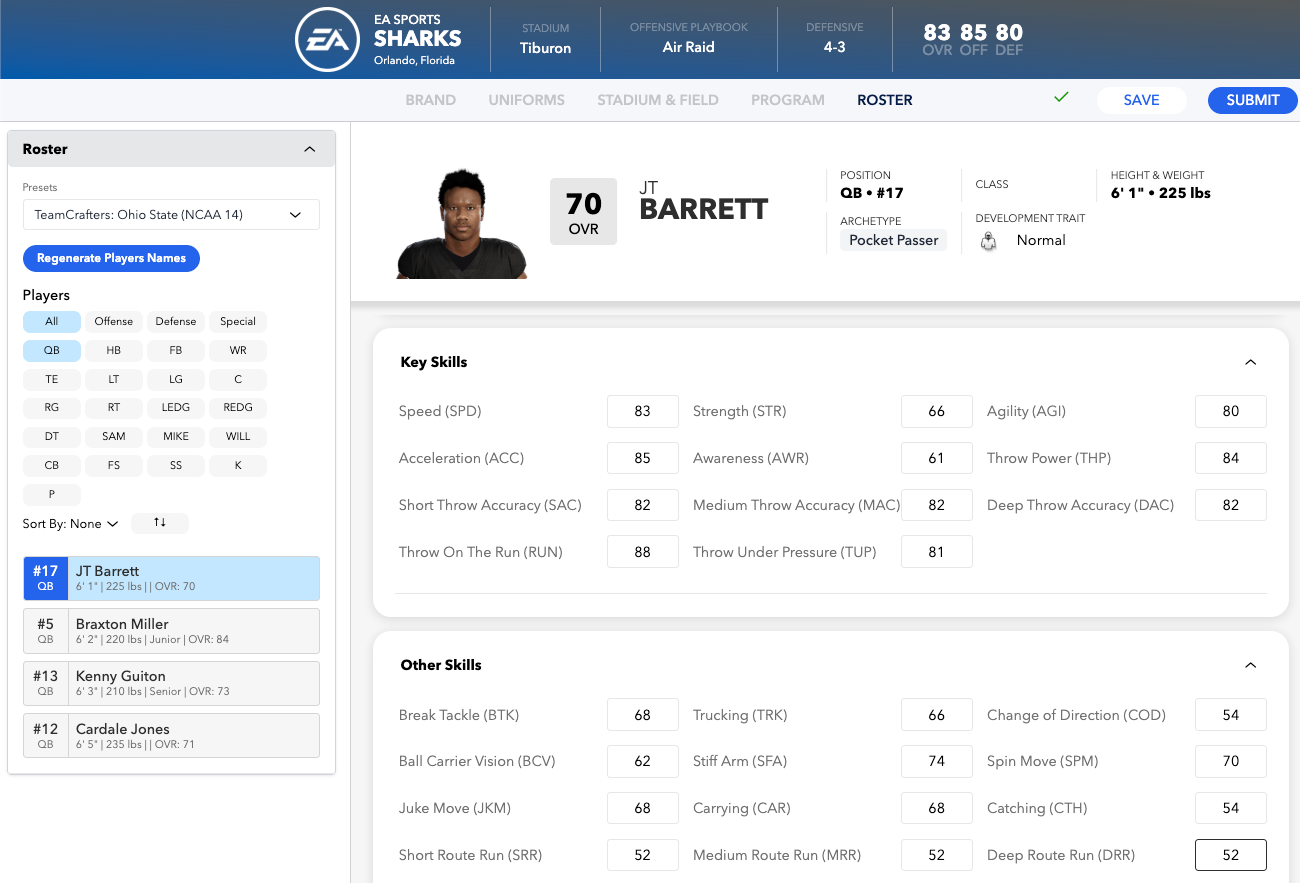
It's a free Chrome add-on from TeamCrafters. You pick a classic team on the TeamCrafters website, click one button, and that team shows up inside EA College Football 27's Team Builder as a roster preset. Pick it, and your whole roster is instantly replaced with the real players.
What comes over:
- Real player names and jersey numbers
- All their ratings
- Positions and depth
- Class year (FR/SO/JR/SR)
- Height and weight
- Skin tone / face
Your uniforms, logos, stadium, and everything else you've set up stay exactly as they were. It only touches the roster.
---
## What you need
- Google Chrome (this is the only browser it's been tested in)
- Access to EA College Football 27 Team Builder in your browser
- That's it — you don't need a TeamCrafters account, the classic rosters are free to browse
---
## How to install it
It's not in the Chrome Web Store yet, so you add it manually. Sounds scarier than it is — takes about a minute, and you only do it once.
1. Download the file.
2. Unzip it. You'll get a folder called teamcrafters-classic-roster-importer.
⚠️ Put that folder somewhere permanent — like your Documents folder. Do NOT leave it in Downloads, and don't delete it later. Chrome loads the add-on from that folder every time, so if the folder disappears, the add-on stops working.
3. Open a new Chrome tab and go to chrome://extensions
4. Flip on Developer mode — it's the toggle switch in the top-right corner.
5. Click the Load unpacked button (top-left), then select the folder you unzipped in step 2.
6. Done. Click the puzzle-piece icon in Chrome's toolbar and pin the TeamCrafters icon so you can see it.
---
## How to use it
1. Go to TeamCrafters and open any classic team, for example: https://www.teamcrafters.net/app/classic-rosters/ncaa-13/alabama
You can browse all the classic rosters here: https://www.teamcrafters.net/app/classic-rosters
2. Click the blue "Copy roster for EA Team Builder" button in the bottom-right corner of the page.
3. Open your team in EA College Football 27 Team Builder and go to "Roster".
4. Go to the roster presets dropdown — the one with Cupcake, Spread, Powerhouse, etc. Where Cupcake normally sits, you'll now see "TeamCrafters: Alabama (NCAA 13)". Click it.
5. Your roster is now the real 2012 Alabama team. Look it over, then hit Save in Team Builder like you normally would.
That's the whole thing. To import a different team, just go copy another one — it replaces whatever you had copied before.
> 💡 Tip: If you copied a roster while Team Builder was already open, refresh the Team Builder page. It loads the presets list when the page opens, so it needs a refresh to see the new one.
---
## Heads up — a few things to know
Ratings are as close as we can get them. Older games didn't track every rating CFB 27 has. For anything the old game genuinely didn't have, we tried our best to calculate them using a formula based off of other ratings.
Faces are approximate. Skin tone carries over, but exact faces, hair, and equipment don't — those come from the base template.
"Cupcake" disappears while you have a roster copied. That's normal — the import takes its spot. Click the TeamCrafters icon in your toolbar and hit Clear copied roster, and Cupcake comes right back.
EA updates can break it. This works by hooking into how Team Builder already loads rosters. If EA changes things on their end, it may stop working until it's updated. If that happens, let us know.
---
## If something's not working
The blue "Copy roster" button doesn't show up. Make sure you're on an actual team page (the URL has a game and a team in it, like /classic-rosters/ncaa-13/alabama). It won't appear on the list of teams, or on the modern CFB 25/26/27 roster pages. Try refreshing.
The preset isn't in Team Builder. Click the TeamCrafters toolbar icon to confirm a roster is actually copied, then refresh the Team Builder page.
---
## Questions, bugs, requests
- Discord: https://discord.gg/FkW8Uaj7DH — quickest way to get help
- Bug reports: https://github.com/jtrosclair/teamcrafters-classic-roster-importer/issues
It's completely free and open source (GPL-3.0), so if you're a developer and want to poke at it or contribute, the code's all right there.
*Not affiliated with, endorsed by, or associated with Electronic Arts. EA, EA Sports, and College Football are trademarks of Electronic Arts Inc.*